PhotoDB Example with Flatbug Dataset
flatbug dataset download link
On the GitHub repository you can find a reprodicble example PhotoDB instance using the flatbug dataset.
Prerequisite: Java 17 (or newer) installation
Setup the Flatbug PhotoDB Instance
1. Download and unpack the database.zip file. This is your PhotoDB instance.
This folder includes the PhotoDB source code and utility files / folders as well as:
photo_data/
This is where image data should be stored in this example. To do so:
2. Download the flatbug dataset and save the unzipped dataset in the photo_data/ folder within your PhotoDB instance.
Your folder structure should look like this:
database
    |-- photo_data
            |-- flatbug_dataset
                    |-- abram2023
                    |-- ALUS
                    |-- amarathunga2022
                    ...
    ...
You have now saved the flatbug image data in parallel to the already instantiated metadata (stored in photo_meta/).
photo_meta/
This is where YAML metadata files are stored in this example. Here, we have already instantiated the metadata files and populated them with the flatbug detections.
Normally, you have to inistiate metadata files yourself after adding image data to your data folder. This is done on the web interface, thus, has to be done after starting the PhotoDB application (see 3.). See 4. for detailed explanation.
After initial metadata creation, the flatbug detections were then integrated into the metadata using the flatbug_json_to_yaml.ipynb notebook. See 5. for a detailed explanation.
config.yaml
This file contains the configuration of this PhotoDB instance, e.g., data / metadata storage location, project name, etc. (see configuration).
photo_classification_definitions.csv
This file contains annotation classes used in the web interface PhotoApp (see classification definition).
win_audio.cmd
3. Execute this file to start the application.
Double click on the file win_audio.cmd to start the application.
4. Instantiate Metadata
Here, metadata have already been instantiated, so this step can be skipped.
Open the web interface 'PhotoApp' at http://127.0.0.1:8080/ and click
Go to AudioApp. This is necessary even though we are using PhotoApp, as all tasks are handled in AudioApp. Now click on the top left button to open the left navigation side panel and select the entry Task submission.
Select the task
photo_create_yaml from the drop down menu at the top left, optionally provide the project name (flatbug_dataset), and click submit task. A pop-up window will open showing you the progress of the task and indicate when the task is done.
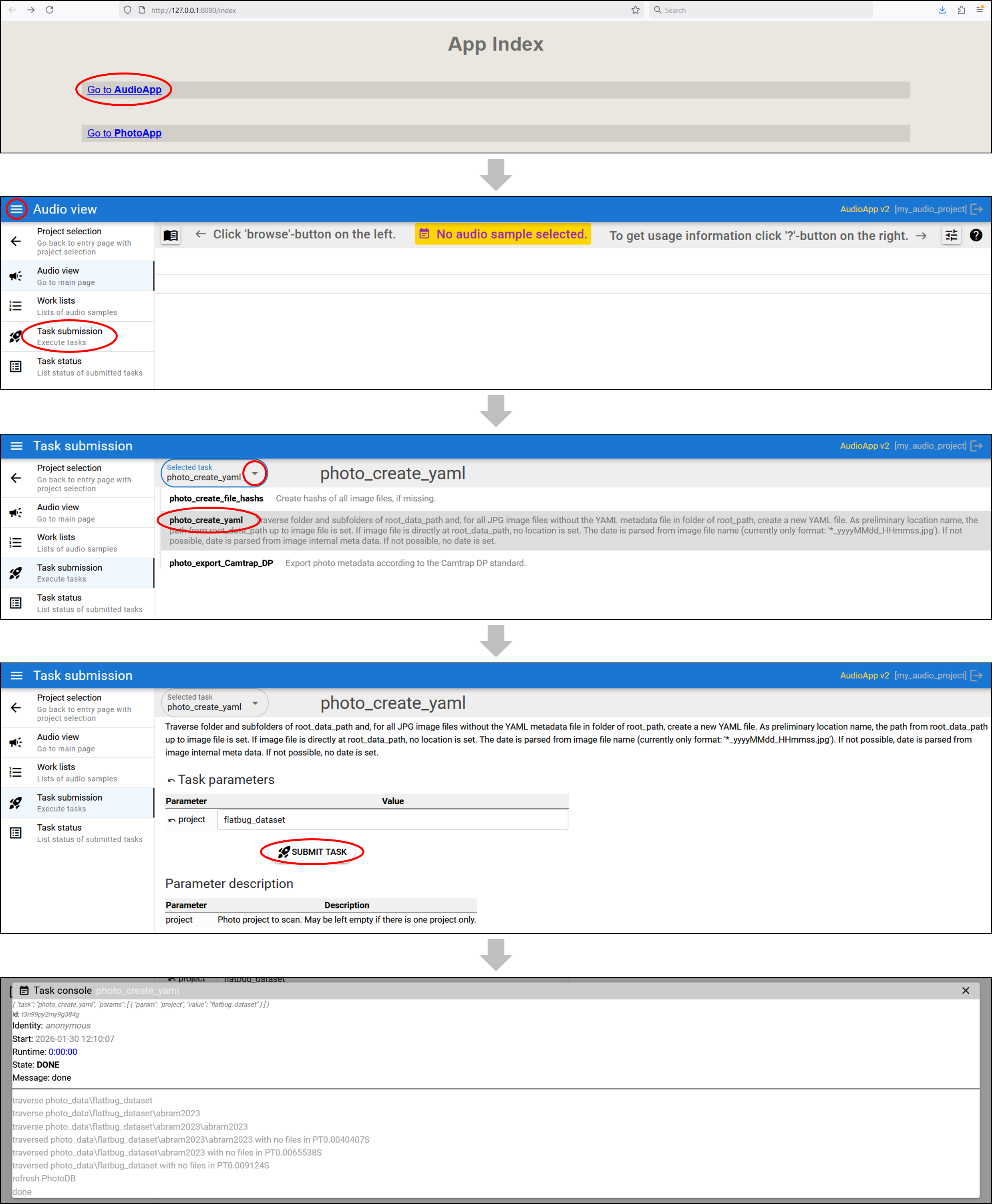
Your metadata files will now be saved in the directory specified as
photo_meta in the config.yaml file.
5. Integrate Flatbug Detections into Metadata Files
Here, the flatbug detections have already been integrated, so this step can be skipped.
Once YAML metadata files are instantiated you can easily manipulate them via direct access, e.g., using a processing script. We used the
flatbug_json_to_yaml.ipynb notebook provided on GitHub, which automates the process of merging JSON metadata from the Flatbug dataset into an existing collection of PhotoDB YAML files as following:
1) import libraries
import yaml
import io
import glob
import os
import json
import datetime
2) locate source files We identify all JSON files in the flatbug dataset directory using a recursive search:
# recursive=True must be set, and you must use ** in the pattern
json_files = glob.glob("./photodb_example_2025_12_18/flatbug_dataset/**/*.json", recursive=True)
3) load JSON metadata Each JSON file is opened and loaded into a list:
jsonList= []

for json_file in json_files:
    with open(json_file) as json_data:
        z = json.load(json_data)
        jsonList.append(z)
4) get existing YAML files We crawl the PhotoDB metadata directory to create a list of all existing YAML files that need updates:
# list all yaml files created by PhotoDB
yamlList = []

for root, dirs, files in os.walk('.\\photodb_example_2025_12_18\\flatbug_dataset_meta'):
    for file in files:
        #print(f"  Datei: {os.path.join(root, file)}")
        yamlList.append(os.path.join(root, file))
        # dirs contains names of subdirectories that still need to be chjecked
6) extract bounding boxes and merge metadata This cide performs the following logic: * matches image filenames from JSON to existing YAML paths * merges both * extracts bounding box coordinates for each image ID * appends a timestamped log entry to the record
#data=jsonList[1]
#i= data["images"][0]

for data in jsonList:
    for i in data["images"]:
        fileName = next((k for k in yamlList if i["file_name"] in k), None)
        if fileName is None:
            #print(f"Warning: No YAML found for {i['file_name']}")
            continue

        # read YAML file
        with open(fileName) as stream:
            data_yaml = yaml.safe_load(stream)

        completeDict = data_yaml | i
        # skip already existing files
        # name of output yaml file
        targetFile = 'photodb_example_2025_12_18/flatbug_dataset_full_meta/' + completeDict["location"] + "/" + completeDict["file"] + ".yaml"
        if os.path.exists(targetFile):
           # print(f"Skipping: {targetFile} already exists")
            continue

        # 'get id
        target_id = i['id']
        # find the first annotation where image_id matches
        ann = [a for a in data["annotations"] if a["image_id"] == target_id]

                # skip if no bounding boxes for the image are available
        if len(ann) <= 0:
            print(f"Warning: No annotation found for image ID {target_id}")
        else:
            w, h = completeDict["width"], completeDict["height"]

            # use the "structure below" but add the math
            completeDict['detections'] = [
                {
                    "bbox": [
                        m["bbox"][0] / w,        # X_min
                        m["bbox"][1] / h,        # Y_min
                        (m["bbox"][2] / w), # X_width
                        (m["bbox"][3] / h) # Y_height
                    ],
                    "classifications": [ {"classification": data["categories"][0]["name"],
                                          "classificator": "manual / semi-automatic",
                                          "identity": "flatbug",
                                          "date": '2025-01-29T00:00:00'}]
                }
                for m in ann
                if m.get("bbox") is not None  # extra safety check
            ]

        # create a new dict with licence information, category and info:
        prefixed_license = {f"license_{k}": v for k, v in data["licenses"][0].items()}
        prefixed_info = {f"info_{k}": v for k, v in data["info"].items()}
        #prefixed_categories = {f"categories_{k}": v for k, v in data["categories"][0].items()}
        # Add it to completeDict
        completeDict.update(prefixed_license | prefixed_info)

        # add log entry for changed yaml
        completeDict["log"].append({"action": "append JSON metadata", "date": datetime.datetime.now().strftime('%Y-%m-%dT%H:%M:%S')})

        # clean dictionary / remove empty entries
        # identify the keys that have empty string values
        keys_to_remove = [k for k, v in completeDict.items() if v == '']

        # delete those keys from the original dictionary
        for k in keys_to_remove:
            del completeDict[k]

        # name of new yaml folder
        newpath = 'photodb_example_2025_12_18/flatbug_dataset_full_meta/' + completeDict["location"]

        #save to new yaml file
        if not os.path.exists(newpath):
            os.makedirs(newpath)

        with open(targetFile, 'w') as outfile:
            yaml.dump(completeDict, outfile, default_flow_style=False, sort_keys=False)
6. Inspect / Add / Correct Annotations with PhotoApp
Open the web interface in a browser at http://127.0.0.1:8080/ (see operating) and click Go to PhotoApp.
Select a datasubset in the Query tab and switch to Viewer to inspect individual images. Use the controls underneath the image to select an annotation bounding box / manipulate the annotation, e.g. by adding a second classification. Click the top-right button to view the metadata in a pop-up window.
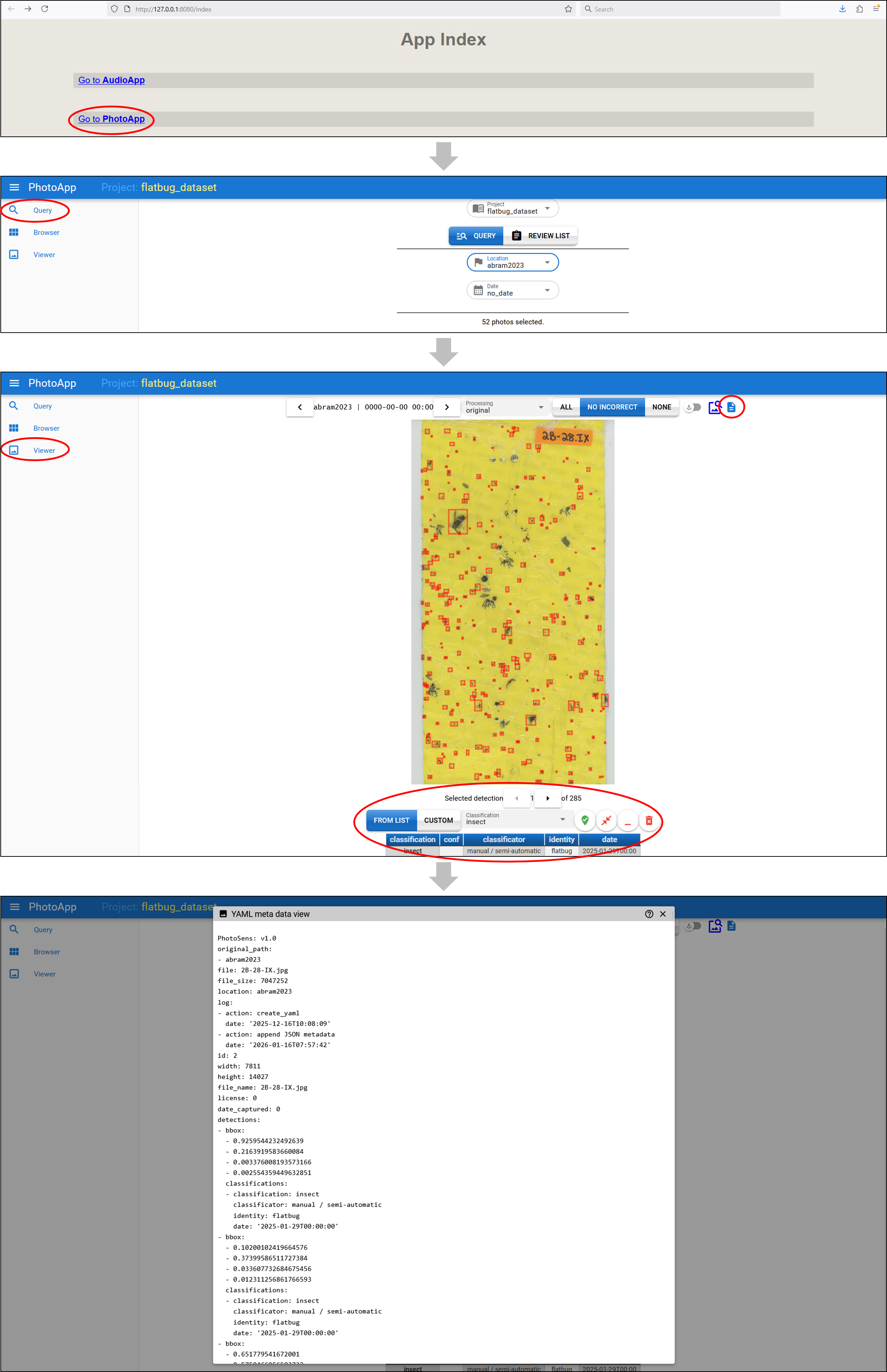
See viewer for detailed explanations of the controls.